Revolutionize Your Presentations: ChatGPT Integrates with PowerPoint for Seamless Slide Navigation
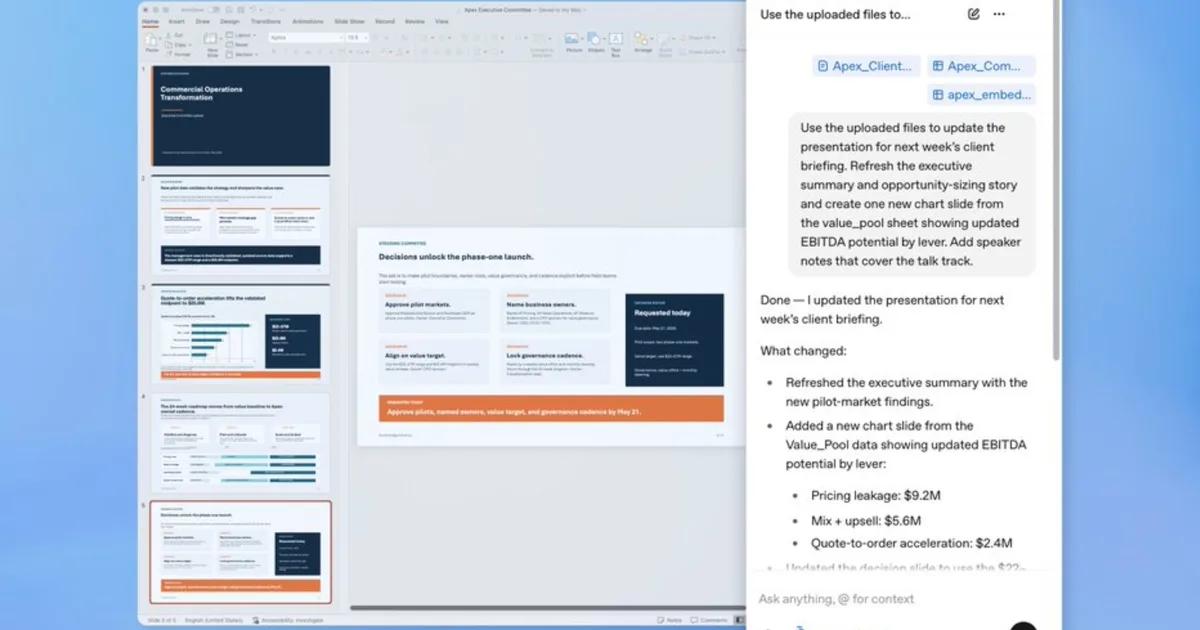
ChatGPT just made its debut in PowerPoint’s sidebar, and it’s revolutionizing the way we approach presentations. No longer is the struggle of crafting slides solely about gathering great ideas; now it’s also about refining and perfecting them seamlessly. For busy professionals, this innovative tool promises to lighten the load and sharpen your presentations in the process.
What Can ChatGPT Do Inside PowerPoint?
Imagine being able to create an entire presentation just by describing what you need. ChatGPT for PowerPoint allows you to do just that! By simply feeding the AI your notes, documents, or even images, it can generate an initial structure for your deck. This means no more starting from scratch—whether you’re looking to create something new or enhance existing slides, the capabilities are extensive.
- Build and Edit: Update individual slides without having to redo the entire deck.
- Real-Time Insights: Perfect for high-stakes meetings, where you can ask ChatGPT to analyze your deck and point out potential weaknesses.
With its advanced reasoning abilities, the AI can identify gaps in your story, highlight logical inconsistencies, and predict the kinds of questions your audience might have. This takes the stress out of public speaking and ensures you’re thoroughly prepared.
Connectivity: A Game Changer
So, how does ChatGPT differ from other tools like Copilot? The primary distinction lies in its ability to connect seamlessly with live data from platforms like Gmail, Outlook, and SharePoint. This means instead of enduring tedious copy-pasting, your presentation can automatically pull in essential information your team has already gathered.
OpenAI’s initiative aims squarely at enhancing real business workflows, making it ideal for quarterly reviews or strategic updates. Whether you’re on a Free, Plus, Pro, Business, Enterprise, or educational tier, the beta version is available globally, letting you install it effortlessly from the Microsoft marketplace or directly within PowerPoint.
Why ChatGPT Stands Out
With ChatGPT’s arrival in PowerPoint, users now have more choices than ever before. Alongside ChatGPT, you can turn to Claude or Microsoft Copilot to handle your slide needs. Each option brings innovation to the table, but ChatGPT’s unique features provide a refreshing edge.
Expertly designed to enhance the way you create presentations, ChatGPT for PowerPoint empowers users to visualize their ideas better than ever. The integration brings a touch of sophistication and efficiency to the often tedious task of presentation crafting.
Are you ready to revolutionize your presentation-honing experience? Dive into the world of AI-assisted presentations with ChatGPT and watch your creativity soar! Whether you’re preparing for an important meeting or working on a project proposal, let this technology elevate your expertise, showcasing your ideas in the most compelling way. Explore the benefits today, and transform how you communicate with your audience!