How to Disable Google Chrome’s 4 GB AI Model Installation on Your Device

Chrome recently made an unexpected move, accessing your device’s storage without a typical permissions request. While Google Chrome has long stood as the browser of choice for many, it’s now facing stiff competition from a novel wave of AI-driven browsers. As Chrome strives to innovate and keep its edge, it seems to have crossed a line that raises questions about user privacy and consent.
Chrome’s Surprising Storage Tactics
Have you ever explored your file manager and stumbled upon a folder named “OptGuideOnDeviceModel”? If so, there’s a chance Chrome has commandeered your storage as if it’s its own personal server. Within that folder lies a hefty file — approximately 4 GB known as “weights.bin.” This is part of Google’s Gemini Nano, an AI model designed to enhance user experience on the browser.
Privacy advocate Alexander Hanff uncovered this silent behavior through meticulous tracking of filesystem logs on macOS. His investigation revealed that a freshly created Chrome profile can see this hefty model download in less than 15 minutes, even while idle.
Did Anyone Ask for This?
Interestingly, no one seemed to request this behavior from Chrome. It doesn’t prompt users for authorization prior to downloading the model. Instead, it activates automatically when Chrome determines that your hardware meets the required specifications — often before you’ve even interacted with any AI features.
Credit: Google Chrome
Should you attempt to delete this file, Chrome promptly reinstalls it upon the next launch. As Hanff eloquently pointed out, your deletion is treated as a transient state rather than a clear directive.
It’s worth noting that the most visible AI feature — the “AI Mode” in the address bar — doesn’t even utilize the local model. Instead, queries made through this feature are sent to Google Gemini servers, while the local model powers more subtle functionalities like “Help me write” in text fields and localized scam detection.
Understanding the Impact and How to Disable It
While this may seem like a straightforward issue regarding storage space, the implications extend much further. Hanff estimates that if 500 million devices received this unwelcome download, the sheer amount of bandwidth used could generate approximately 30,000 tonnes of CO2 emissions. This figure is akin to the annual emissions from roughly 6,500 cars, purely from the delivery process, not even factoring in ongoing usage.
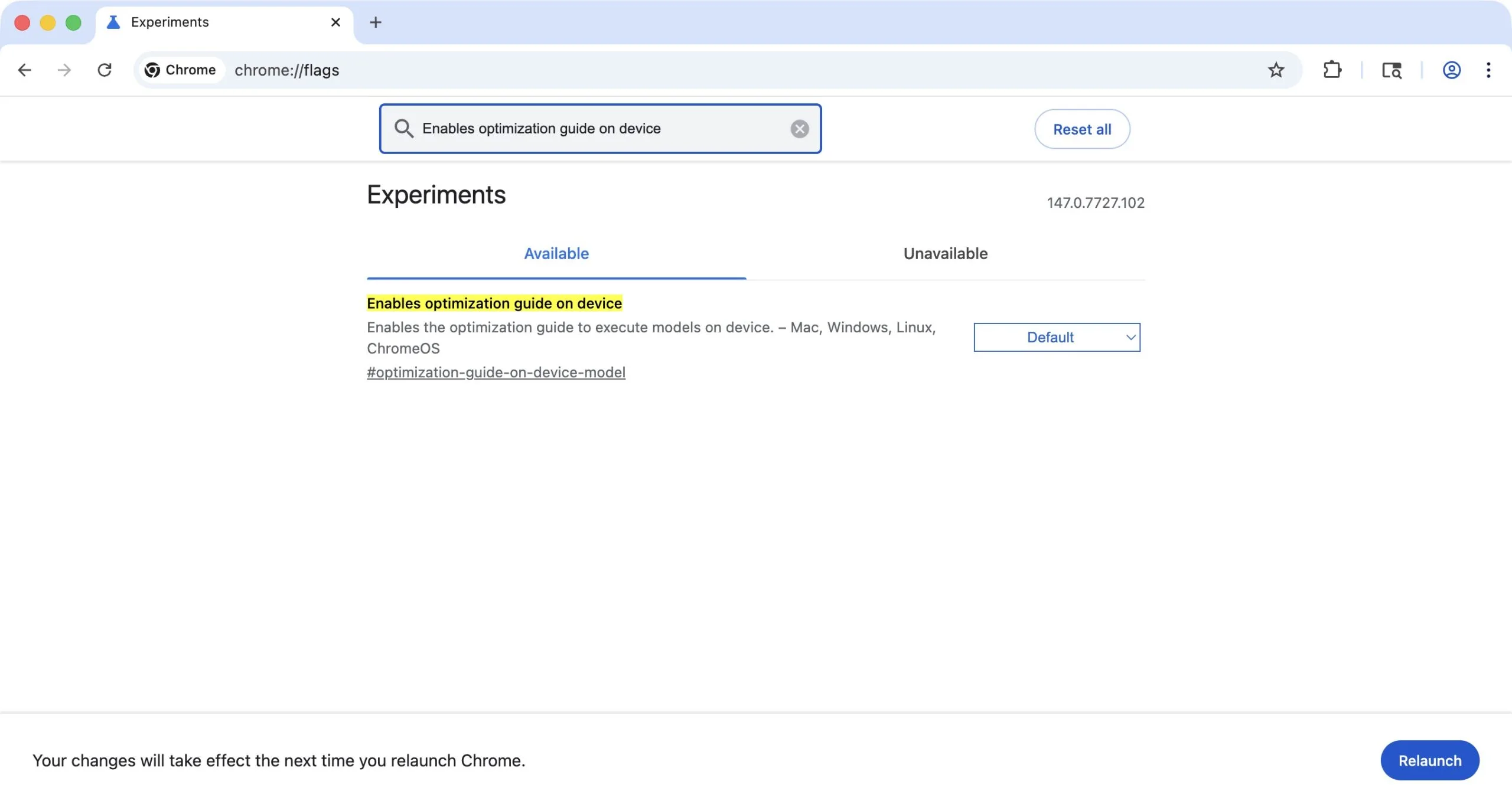
Credit: Rachit Agarwal / Digital Trends
For those looking to regain control, it’s essential for Google to implement a user confirmation requirement for this download. As of now, you can disable it yourself by navigating to “chrome://flags.” Simply search for “Enables optimization guide on device” and turn it off. Although the process may feel cumbersome, it effectively prevents further downloads.
In this ever-evolving digital landscape, staying informed about what’s happening behind the scenes is crucial. Remember to periodically check your settings and storage, ensuring your experience aligns with your expectations. Embrace the beauty of informed choices — it’s powerful to know you have control over your digital space.