Google Meet Now Offers Note-Taking for In-Person Meetings: Streamline Your Workflow!
We’ve all experienced it: sitting in a meeting, keen to share our thoughts yet simultaneously juggling a notepad or a device to jot down important points. The struggle to stay present while ensuring nothing critical is missed often leaves us feeling torn. Fortunately, there’s a game-changer on the horizon.
Google Meet’s Innovative Note-Taking Feature
At the recent Google Cloud Next 2026 event in Las Vegas, Google unveiled a remarkable feature designed to revolutionize how we conduct meetings. This new capability allows Google Meet to effortlessly handle note-taking, extending its benefits beyond just video calls to in-person gatherings. Imagine focusing solely on the discussion while your notes are taken care of—that’s the power of this innovation.
How Does Google Meet’s Note-Taking Feature Work?
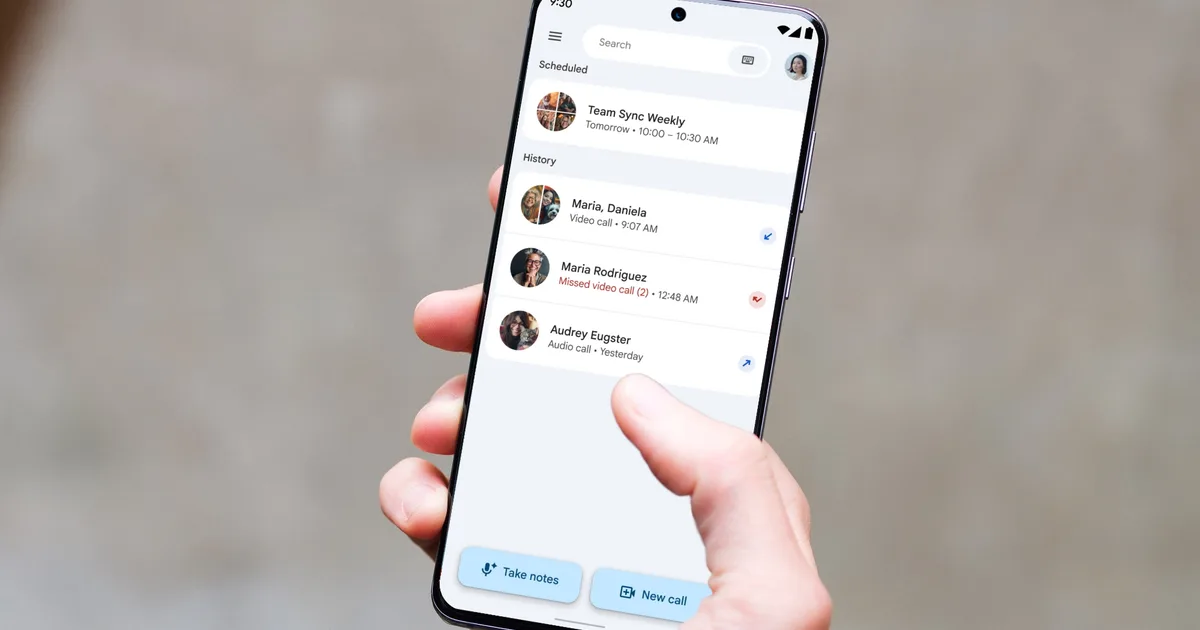
Getting started with this new feature is a breeze. Simply launch Google Meet in your web browser or mobile app, then tap the “Take Notes” button right from the home screen. Once recorded, Gemini—Google’s advanced AI—begins capturing all the nuances of the conversation unfolding in the room.
Image Credit: Google
Once your meeting concludes, tap the button again to stop recording. Gemini will then work its magic, compiling everything into a comprehensive summary that includes action items and a full transcript, all neatly organized in a new Google Doc.
This document will be saved automatically to your Google Drive, and you’ll conveniently receive an email with the link. No more frantic searches for crucial meeting details later on!
Who Gets Access to This New Feature?
For those in administrative roles, integrating this feature is seamless as it aligns with your existing Google Meet notes settings—there’s no extra configuration needed.
Here’s how the rollout looks:
- Android Users: Access begins on August 11.
- Web Users: Rollout starts from August 14.
- iOS Users: A bit of a wait until August 31.
Be aware that your access may vary depending on your platform; you might have it already or need to hold on for a little longer.
This innovative feature is available for users on various plans, including Business Standard and Plus, Enterprise Standard and Plus, Google AI Pro and Ultra, and Frontline Plus.
Embrace this exciting addition to enhance your meetings and leave the note-taking to the pros.
As you step into your next meeting, imagine the potential of focusing entirely on the dialogue—allow Google Meet to be your built-in scribe and transform how you collaborate.
Ready to elevate your meeting experience? Explore the power of this feature and start bringing your full attention to every conversation.