Exciting Upcoming Chrome Update: What Every Android User Needs to Know
Gemini is set to transform the browser experience, becoming the pivotal element in Google’s AI strategy. As the sophisticated world of digital interaction evolves, this cutting-edge technology aims to enhance your browsing journey, making it more intuitive and supportive. Starting this June, users can look forward to an impressive suite of AI-driven features integrated seamlessly into Chrome on Android, turning your browser into a vital tool for planning, thinking, and acting in real time.
Chrome Gets a Smarter Assistant
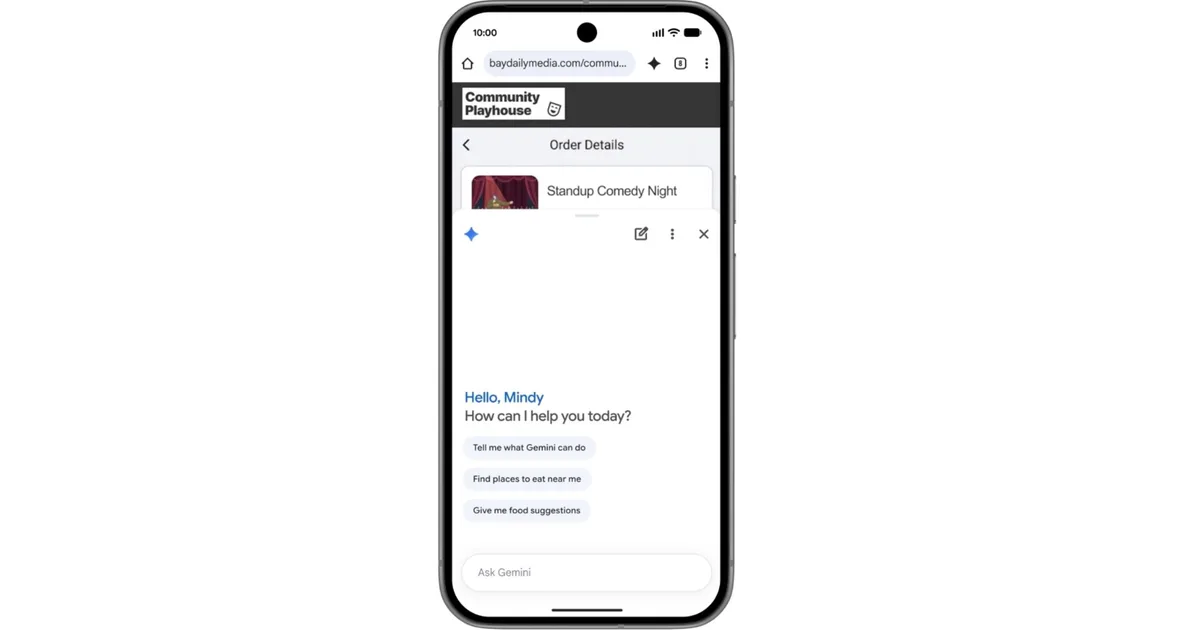
At the core of this groundbreaking update is a more contextual version of Gemini within Chrome. Google envisions it functioning much like a personal assistant—one that truly grasps the nuances of what you’re viewing online. Imagine not needing to flip between apps or tabs; with just a tap on the Gemini icon, you can pose questions directly about the page at hand.
- Break Down Long Articles: Transform lengthy texts into concise summaries.
- Simplify Complex Topics: Get clear, understandable explanations effortlessly.
This innovative approach allows you to stay focused on the content without disruptive interruptions.
Image credit: Google
Seamless Productivity Integration
Google isn’t stopping at basic summaries. The Gemini update aims to boost productivity within Chrome by connecting to the broader Google ecosystem, enabling truly contextual assistance. The functionality will allow users to:
- Add events to your calendar without leaving the browsing session.
- Save recipe ingredients directly into Keep.
- Extract information from Gmail while you browse.
This integration marks a shift from simple searching to completing tasks effortlessly, adding a layer of utility that feels genuinely transformative.
Tackle Tedious Tasks with Ease
Gemini introduces a feature known as Nano Banana, designed to infuse creativity into your browsing experience. This tool lets you generate visuals based on what you’re observing online. For students or professionals, it can condense dense material into visual summaries, making information easier to digest and retain.
Moreover, Chrome is debuting auto-browse, a feature aimed at background assistance for repetitive tasks. Planning a visit? Simply share the event, and Chrome will intuitively gather parking details and relevant information.

Image credit: Google
Prioritizing Your Safety
In addition to its remarkable functionality, Google places a strong emphasis on security in this update. Built-in protections target rising threats, such as prompt injection attacks, ensuring that the AI remains trustworthy and reliable during your interactions.
The rollout of these advanced features begins in June and is available for select devices running Android 12 or newer in the US. Auto-browse will initially cater to AI Pro and Ultra subscribers on compatible devices.
While it’s still early days, it’s clear that Chrome is evolving from a standard browser to a proactive partner in your online endeavors.
As we embrace these exciting changes, remember that the way you browse is about to get a lot smarter. Stay ahead of the game and explore these features once they’re live—your browsing experience will never be the same.