Unlock Microsoft Copilot: Elevate Your Productivity with Enhanced Workflow in Word, Excel, and PowerPoint
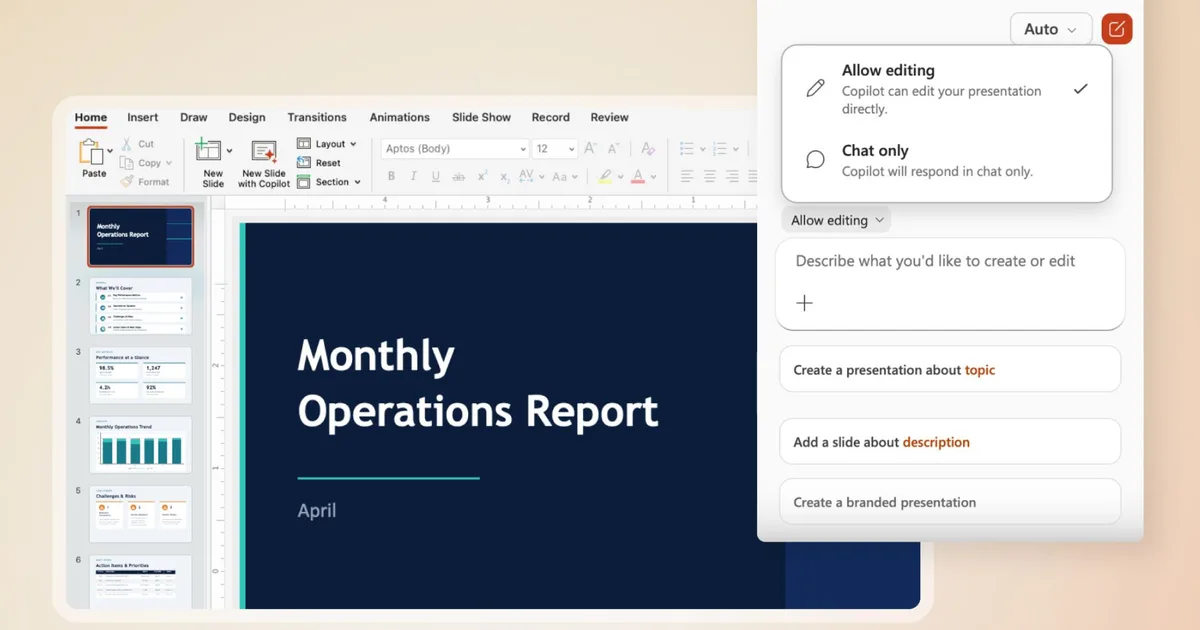
Microsoft is unveiling an exciting new feature for its Office suite, aimed at enhancing the productivity of its users. With the introduction of Agent Mode in Word, Excel, and PowerPoint, Microsoft is transforming how we interact with its applications. This powerful addition is designed to make your work experience more intuitive, helping you harness your creativity effortlessly.
What is Agent Mode in Microsoft Copilot?
Previously, Microsoft Copilot served primarily as a passive assistant, providing answers but unable to take meaningful actions within your documents. Sumit Chauhan, President of the Office Product Group, recognized this limitation. When Copilot first debuted, the underlying AI technologies weren’t sophisticated enough to execute commands directly in documents.
Fast forward to today, and significant advancements in AI have elevated Copilot’s capacity. With Agent Mode, it can now perform complex edits, all while preserving your original intent. This remarkable evolution means you can focus on your vision while Copilot takes care of the details.
Unleashing the Power of Copilot Agent Mode
So, what exactly can you expect from Copilot Agent Mode in Word, Excel, and PowerPoint? The possibilities are extensive:
- Word: Whether you need to draft, rewrite, or restructure content, Copilot can seamlessly adjust the tone of your writing, making it more aligned with your audience.
- Excel: No more manual data manipulation! Copilot now works directly within your workbook, adding formulas, tables, and visuals to transform raw data into insightful narratives.
Microsoft
- PowerPoint: Keeping your presentations fresh is a breeze. Copilot updates existing slides with new information while adhering to your company’s template style.
Early metrics from Microsoft reveal impressive results: engagement in Excel surged by 67%, user satisfaction climbed 65%, and overall user retention jumped 50%. These numbers highlight the tool’s capability to enhance both productivity and user experience.
What Lies Ahead for Microsoft Copilot?
Microsoft has ambitious plans for the future. Upcoming enhancements will focus on deeper editing capabilities for more complex workflows, as well as increased transparency regarding any changes made. Additionally, Microsoft is exploring various integrations and improvements related to Copilot, establishing it as a cornerstone of efficiency rather than just a novelty.
As you consider leveraging these advanced tools, remember that Microsoft is making consistent efforts to ensure that Copilot remains a reliable productivity ally. It’s time to embrace the synergy of human creativity and intelligent automation.
In this fast-paced digital age, why not elevate your work to new heights? Explore Microsoft Copilot today and unlock your potential. Let technology work for you, so you can concentrate on what matters most—your success!