Unleash Gemini on Mac: Transform Speech into Text and Visual Insights into Action
The Gemini app for macOS has just undergone an exciting upgrade, introducing features that promise to revolutionize your productivity. Designed with the discerning, beauty-conscious user in mind, this app marries sleek functionality with sophisticated elegance. Imagine having a digital assistant that comprehends your needs, cleans up your spoken language, and manages your tasks seamlessly. Let’s delve into what this latest update has to offer.
Effortless Dictation Across Your Mac
With the latest enhancement, simply long-press the Fn key in any application, and start speaking. Gemini will transcribe your words into clear, polished text right at your cursor. This intuitive feature not only eliminates distracting filler words like “ums” and “ahs,” but it also requires no setup—it’s ready to use right out of the box. Whether you’re composing an email, responding to a Slack message, or drafting a report, Gemini knows how to keep up.
While other dictation applications, like Wispr Flow and Willow, offer similar transcription capabilities, they often come with additional downloads or subscription fees. With Gemini’s built-in dictation function, there’s little reason for Mac users to seek out a standalone tool. The feature is currently available in English, though Google plans to expand language support later this year.
Contextual Intelligence: Gemini Sees What You See
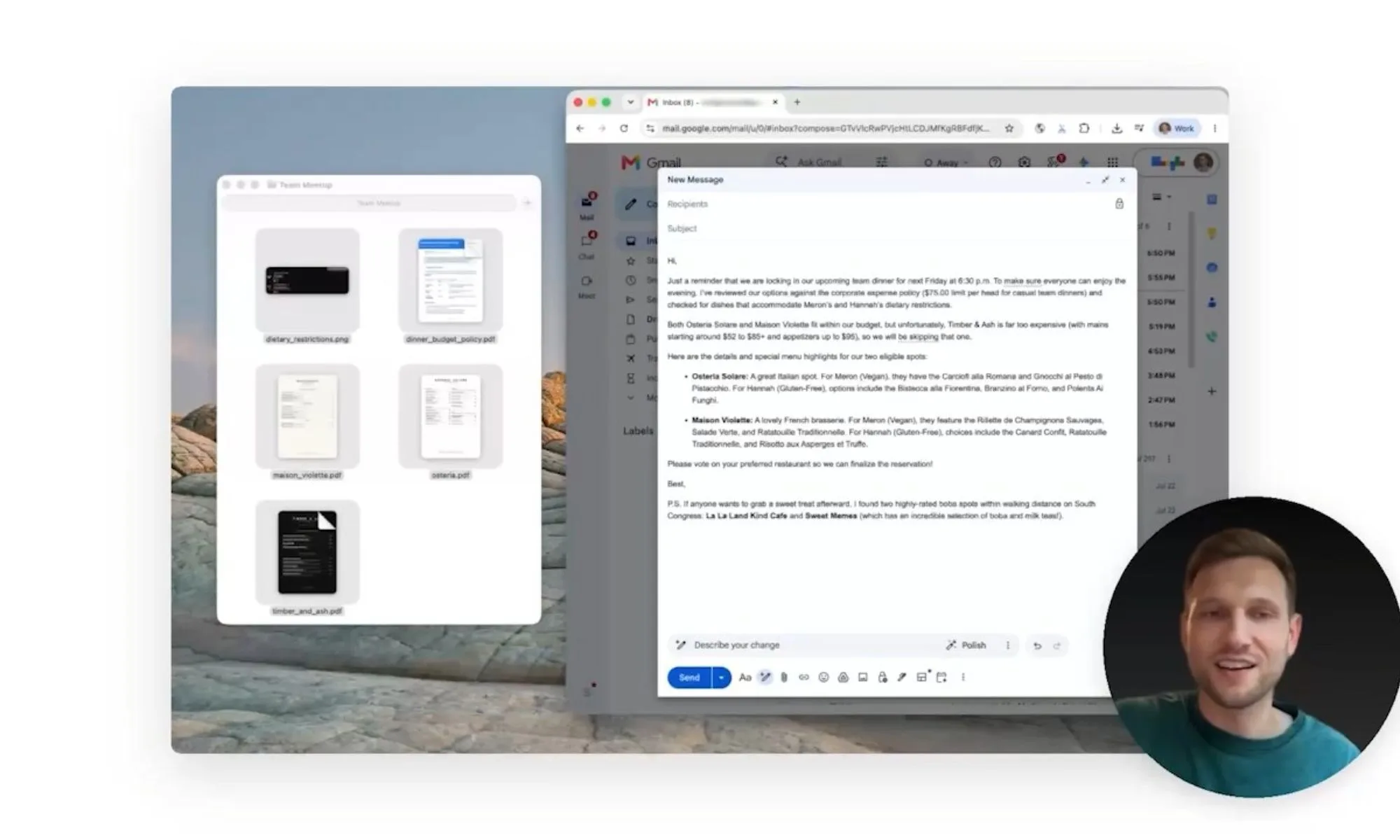
In addition to dictation, Gemini now possesses the remarkable ability to recognize and interact with the content displayed on your screen. This opt-in feature allows your digital assistant to utilize the context of your active windows for more complex tasks. Picture this: you have a page of rough notes highlighted, and with a simple request, Gemini transforms those scrawls into a polished executive summary, placing it precisely where you need it.
Google
Imagine asking Gemini to review highlighted documents for budget policies and dietary restrictions while planning a team dinner. Not only can it craft a reminder email based on that information, but it can also fetch boba shop recommendations nearby, all in one seamless interaction.
With these new features, Gemini on Mac is evolving beyond simple commands and answers. It’s becoming a powerful tool that can transcribe your speech and intelligently respond to what’s on your screen, positioning itself ahead of Apple’s Siri, which has yet to implement similar advancements.
In a world where efficiency and clarity matter, Gemini stands out as not just an assistant, but a reliable partner in your daily endeavors. Why not embrace this cutting-edge technology and elevate your productivity? Download the latest version of Gemini and experience the transformation for yourself. Your journey towards effortless productivity begins now!