Chuwi CoreBook Air Review: The Ultimate Budget Laptop for Breaking Brand Barriers
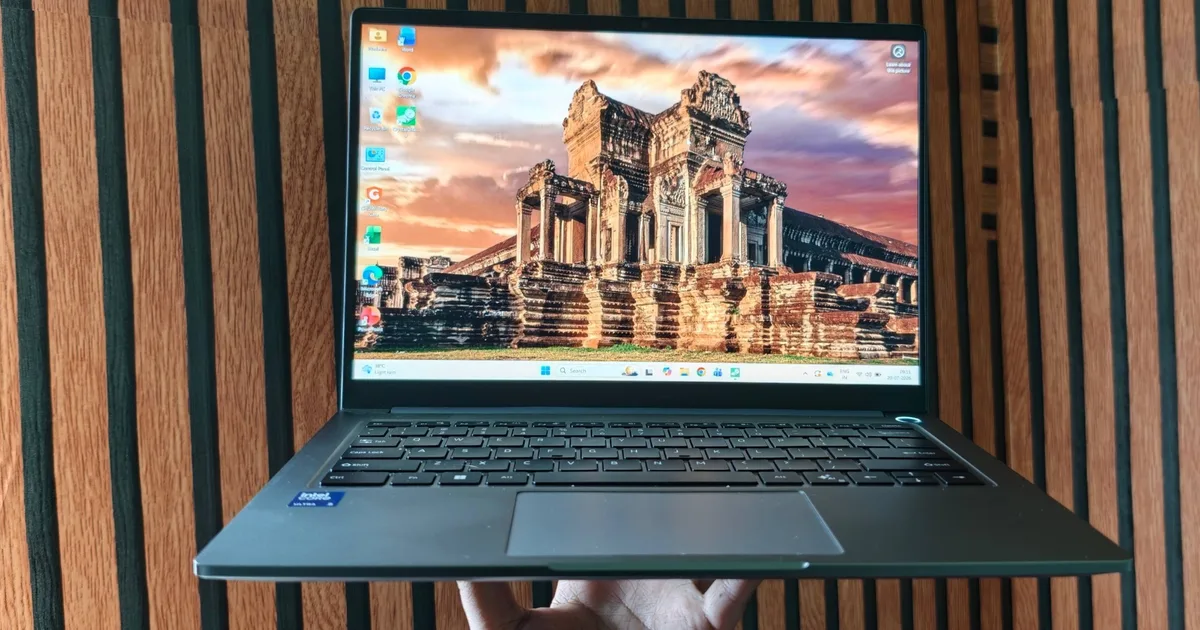
Chuwi’s CoreBook Air is a hidden gem in today’s budget laptop landscape, catering to the needs of a technology-savvy audience. For those who seek quality without breaking the bank, this machine delivers a sophisticated blend of performance and aesthetics. With the continually evolving demands of tech users, Chuwi has created a laptop that stands out not just for its price point but also for its impressive features.
Overview: A Laptop for the Intelligent Buyer
Key Features and Pricing
The Chuwi CoreBook Air holds a starting price of $779, making it a noteworthy competitor in the realm of budget laptops. With the rising costs of electronics, finding a device that combines affordability and functionality can be challenging. However, Chuwi’s latest offering rises to the occasion with an Intel Lunar Lake processor at its core.
Pros and Cons
Pros:
- Stunning 2.8K 120Hz display that enhances your viewing experience.
- Equipped with Dual Thunderbolt 4 ports, offering versatile connectivity options.
- Crafted with a premium metallic build, ensuring durability.
- Excellent overall performance for everyday tasks.
- Innovative camera design featuring a physical shutter for privacy.
Cons:
- Non-upgradable memory, capped at 16GB.
- Sound quality from speakers is notably weak.
- Storage speed is somewhat sluggish.
- Cooling fans can become quite noisy during intensive tasks.
Quick Verdict
Shopping for a laptop in today’s economy is no small feat, especially with widespread supply chain disruptions affecting prices and availability. The CoreBook Air emerges not only as an affordable alternative but as a solid contender in a saturated market. After spending considerable time with this device, I can confidently say that it’s redefining expectations for what you should receive at this price.
Performance That Delivers
Equipped with the Intel Core Ultra 5 226V, this laptop efficiently balances performance and power consumption. The highlight, however, is its eye-catching 14-inch 2.8K IPS display, which offers fluid visuals thanks to the 120Hz refresh rate. Such features are typically reserved for pricier devices, making the CoreBook Air a valuable investment.
Specifications: What’s Under the Hood
- Operating System: Windows 11 Pro
- Display: 14-inch 2.8K (2880×1800) IPS with a 120Hz refresh rate
- CPU: Intel Core Ultra 5 226V, 8 cores
- GPU: Intel Arc 130 V
- Memory: 16GB LPDDR5X
- Storage: 512GB PCIe 3.0 SSD
- Battery: 55Wh Lithium-Polymer
- Weight: Approx. 1.2 kg
Design and Build: Premium Feel at a Budget Price
Stylish and Lightweight
With its CNC-machined aluminum chassis, the CoreBook Air feels luxurious yet practical. Weighing only 1.2 kg and measuring at 9 mm at its thinnest point, it’s designed for portability without sacrificing sturdiness. Holding it doesn’t cause strain—a vital factor for those frequently on the move.
Hinge and Flexibility
The laptop features a stable hinge design, allowing for easy adjustments and flexibility. It smoothly holds its display at various angles, making it a convenient choice for presentations or casual browsing from different positions.
Display: A Visual Treat
Stunning Screen Performance
One of the standout features of the CoreBook Air is its display, which boasts a 2880×1800 pixel resolution. The 120Hz refresh rate enhances fluidity during scrolling and navigating through tasks. The anti-glare finish helps keep reflections at bay, making it user-friendly even under bright conditions.
Color Accuracy
The laptop offers perfect 100% sRGB coverage, making it suitable for casual photo editing and multimedia consumption. While not designed for professional-grade editing, the screen’s quality is impressive for its price category.
Keyboard and Trackpad: Efficiency Meets Comfort
Chuwi didn’t skimp on the keyboard experience, equipping the CoreBook Air with a full-sized, backlit keyboard that feels rewarding during prolonged use. The tactile feedback ensures that typing remains comfortable, making tasks such as writing and editing a breeze.
The large touchpad is smooth and responsive, accommodating various gestures without hiccups, though the clicks can be a tad noisy in quiet surroundings.
Ports and Camera: Versatile Connectivity
Port Availability
The port selection on this laptop is surprisingly diverse for its compact design. It includes HDMI 2.0, USB 3.2 options, and dual Thunderbolt 4 ports, capable of delivering up to 40Gbps data transfer—all essential for today’s multitasking environment.
Webcam Features
The 2MP webcam is decent for video conferencing and integrates a physical privacy shutter, reinforcing your control over online presence—a thoughtful touch in the age of digital security concerns.
Performance: A Solid Companion for Every Task
The CoreBook Air handles day-to-day tasks like web browsing, document editing, and even light gaming impressively well. Smoothed with the new Intel Arc 130V graphics, users can expect reliable performance in productivity software and creative applications alike, making it a versatile machine for a variety of tasks.
Battery Life: Impressively Long-Lasting
With a 55Wh battery, the CoreBook Air offers an impressive real-world battery life, easily sustaining a full workday. While the manufacturer claims up to 15 hours, users can realistically expect around 12 hours under typical usage, optimizing both work and play.
Conclusion: Is the Chuwi CoreBook Air Right for You?
An excellent blend of performance, design, and affordability makes the Chuwi CoreBook Air a compelling choice for students, professionals, and casual users alike. With its advanced display, comfortable keyboard, and effective processing capabilities, this laptop is not just an affordable option but a potential cornerstone of your tech setup.
If you find yourself frequently juggling spreadsheets, video calls, or casual gaming, this machine deserves a spot on your shortlist. Remember to consider your need for RAM; if your tasks demand more than 16GB, that could be a deciding factor.
For those ready to elevate their computing experience without the hefty price tag, the Chuwi CoreBook Air is a recommendation worth taking seriously. Explore what this budget powerhouse can do for you today!