Zoho Sheet
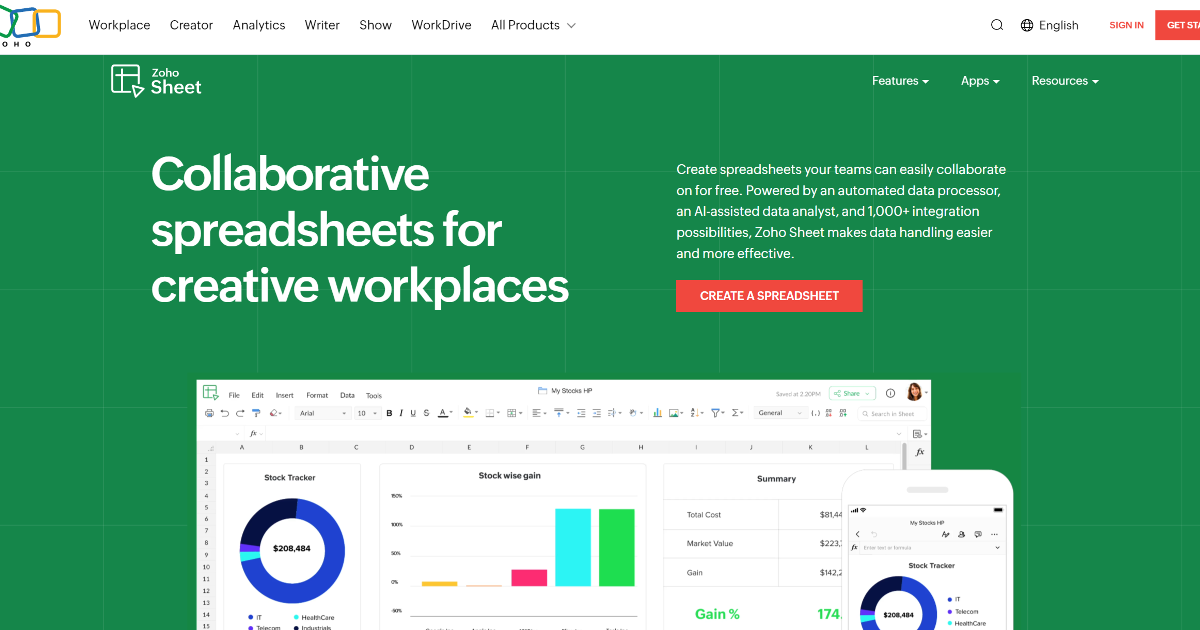
Zoho Sheet is making waves in the world of spreadsheet applications, and it’s easy to see why. This online productivity tool offers a seamless experience for creating, editing, and collaborating on spreadsheets—all in real time. Whether for simple calculations or complex data analysis, Zoho Sheet is designed to cater to a variety of needs, making it an essential part of many workflows.
What is Zoho Sheet?
Zoho Sheet is an advanced online spreadsheet application that goes beyond merely storing data. It combines powerful AI-driven features with extensive compatibility, giving users the tools they need to tackle anything from basic data entry to intricate numerical analysis. With built-in automation software, Zoho Sheet ensures that your workflow remains efficient and organized.
Key Features of Zoho Sheet
-
Automated Data Processor: This feature simplifies data management by automating repetitive tasks, which significantly reduces human error.
-
AI-Assisted Data Analyst: Harnesses sophisticated AI algorithms to provide insights, generate reports, and interpret data, elevating the ability to perform complex analyses.
-
Comprehensive Integration: Connects with over 1,000 Zoho applications and various cloud-based software, ensuring seamless workflows.
- Real-Time Collaboration: Allows multiple users to work on a spreadsheet simultaneously, with features like cell locking, change tracking, and effective version management.
Benefits and Advantages
Using Zoho Sheet offers several advantages that can boost productivity. Its flexibility supports various work styles, while the AI-powered features help streamline tasks. Collaboration becomes effortless, allowing teams to tackle projects together regardless of their location. Furthermore, with robust security measures in place, your data remains protected.
How Zoho Sheet Works
Zoho Sheet functions on an intuitive interface that makes data manipulation a breeze. Users can create spreadsheets online, perform computations, and visualize data through charts and pivot tables. The platform’s automation capabilities help streamline workflows, enhancing efficiency. Additionally, the integration options allow for a more customizable experience tailored to specific business needs.
Use Cases / Real-World Applications
Zoho Sheet finds applications in various sectors:
- Financial Analysts: For detailed financial forecasting and budgeting.
- Project Managers: To track timelines and manage resources effectively.
- Educational Institutions: For managing administrative data and activities.
- Healthcare Professionals: To handle patient data and scheduling logistics.
- Nonprofits: For tracking grants and event planning logistics.
Comparison with Alternatives
When stacked against alternatives like Microsoft Excel or Google Sheets, Zoho Sheet stands out due to its AI capabilities and seamless integration with other Zoho applications. While Excel offers extensive features, Zoho Sheet provides a more user-friendly interface and significantly benefits teams focused on collaboration. Google Sheets offers similar functionality but may lack the depth of automation and advanced features found in Zoho Sheet.
Pricing and Plans
Zoho Sheet provides an affordable entry point for users, offering a free version with essential features. For more advanced functionalities, various premium plans are available. Check the Zoho Sheet official website for the most current pricing options.
Pros and Cons
Pros
- Highly Customizable: Users can add interactive elements like drop-down menus.
- Cross-Platform Accessibility: Accessible from web browsers and mobile apps, ensuring productivity on the go.
- Excel Compatibility: Smooth transitions from Excel with no loss of formatting.
- Advanced Charting: Nearly 40 chart types available for easy data visualization.
Cons
- Learning Curve: New users might need time to adapt to advanced features.
- Internet Dependency: Requires a stable internet connection for uninterrupted access.
- Feature Overload: The extensive features can be overwhelming for basic users.
Tips for Getting the Most Out of Zoho Sheet
To maximize your experience with Zoho Sheet, consider these tips:
- Explore AI Features: Utilize the AI-driven tools for data analysis and insights.
- Leverage Templates: Start with pre-made templates to streamline common tasks.
- Utilize Integrations: Connect with other Zoho apps and third-party tools to enhance functionality.
- Encourage Collaboration: Share your sheets with teammates and leverage real-time editing features.
Conclusion
Zoho Sheet is an exceptional productivity tool that brings together advanced features and user-friendly design. Its automation software and collaboration capabilities make it ideal for a range of applications—from corporate finance to educational management. Whether you’re analyzing data or coordinating projects, Zoho Sheet proves to be a cost-effective solution that meets diverse needs. With its innovative approach to spreadsheet management, it stands as a compelling option for businesses and individuals alike.
For further insights, check resources like Capterra and TechRadar for reviews and comparisons.