Unlock No-Code Creativity: Build Mini Apps Effortlessly with Opal on the Gemini Web App
Google Labs’ Opal Now Enriches Gemini’s Gems Manager
In the world of AI, innovation knows no bounds, and Google Labs’ latest offering is a testament to that. Opal has seamlessly integrated within Gemini’s Gems manager, transforming the way we approach AI workflows. If you’ve been yearning for an intuitive means to craft custom tools without diving into code, you’re in for a treat with this revolutionary tool.
Discover Opal Within Gemini
Opal, now featured in the Gemini web app, enables you to build reusable AI mini-apps right where you manage your Gems. This new functionality allows you to create bespoke workflows with simplicity and ease. Gone are the days of intricate code—Google’s latest experiment makes custom tool creation accessible to everyone.
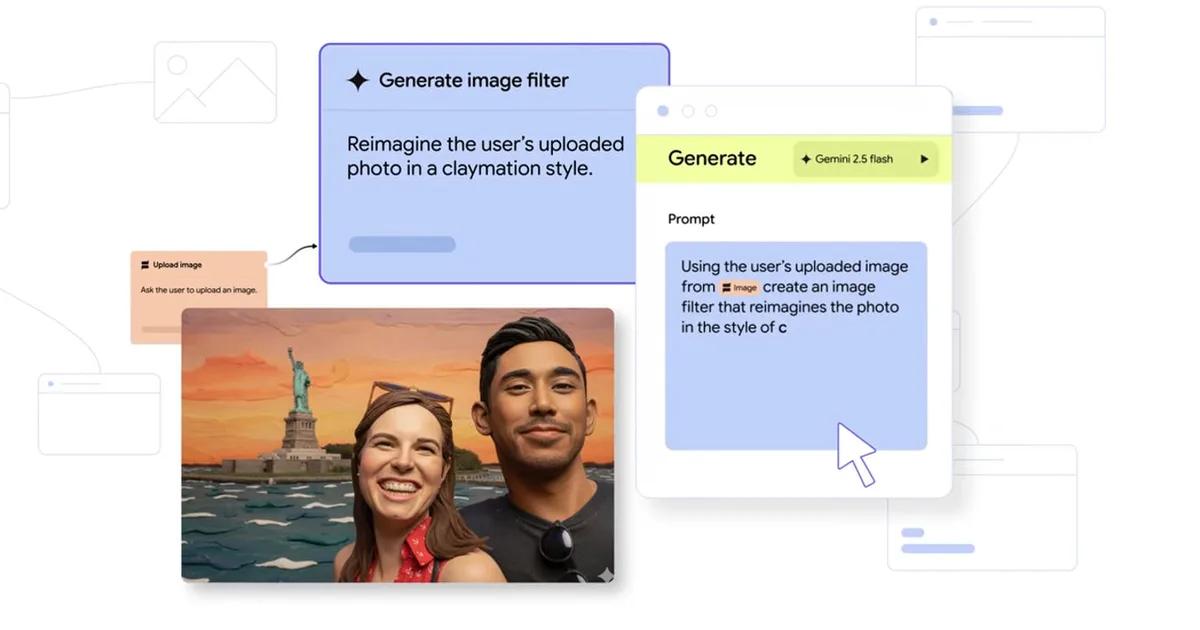
According to Google Labs, Opal is designed as a visual, natural-language builder. This means you can chain prompts, model calls, and tools into a streamlined mini app. Plus, with Opal handling hosting, sharing your creations is hassle-free—no need for server setups or deployments on your part.
Easy Access Through the Gems Manager
To begin your journey with Opal, just navigate to your Gems manager within the Gemini web app. Look for the Opal option and discover how effortless it is to create experimental Gems. In mere moments, you can articulate what you’d like your mini app to do using plain language, edit the generated workflow, and save it for future use.
Google’s focus on rapid prototyping means you can finally turn repetitive tasks into reusable workflows that enhance your productivity. No more redundant efforts—just efficient, repeatable outcomes at your fingertips.
Enhanced Clarity with a Step-by-Step View
Opal’s editor is incrementally improving, introducing a new step list view that clarifies the structure of your workflows. This feature allows you to convert your prompts into a detailed step-by-step list, making it easier than ever to identify the function of each part and pinpoint where adjustments may be needed.
This intuitive upgrade is essential for maintaining the no-code ethos; if something doesn’t function as planned, you can easily modify that specific step without rewriting the entire workflow.
For those seeking greater control, Google directs users to the Advanced Editor at opal.google. Think of Opal as your go-to for quick builds, while the Advanced Editor serves as your toolkit for more intricate workflows.
Try Opal Today
Both Opal and the Advanced Editor are accessible now: find Opal within the Gems manager in the Gemini web app, or explore the standalone Advanced Editor at opal.google. Spend a moment comparing this with the best AI tools available, and you might just find your new favorite way to streamline AI tasks.
Are you ready to enhance your AI experience? Dive into Opal today and unleash your creativity with ease! Your next innovative solution is only a few clicks away.