Transform Your Messages: Experience ChatGPT Translate for Enhanced Rewriting, Not Just Translation
You get a standalone translator plus one-tap rewrites for tone and audience, but it’s still a text-first tool today.
In the fast-paced world of communication, conveying the right message in the right tone is essential. For those who value eloquence and clarity, ChatGPT Translate is here to elevate your language translation experience. This streamlined tool allows you to paste text, receive swift translations, and move on—but it’s so much more than just a tool; it’s a bridge to more sophisticated communication.
Instant Translations: Swift and Efficient
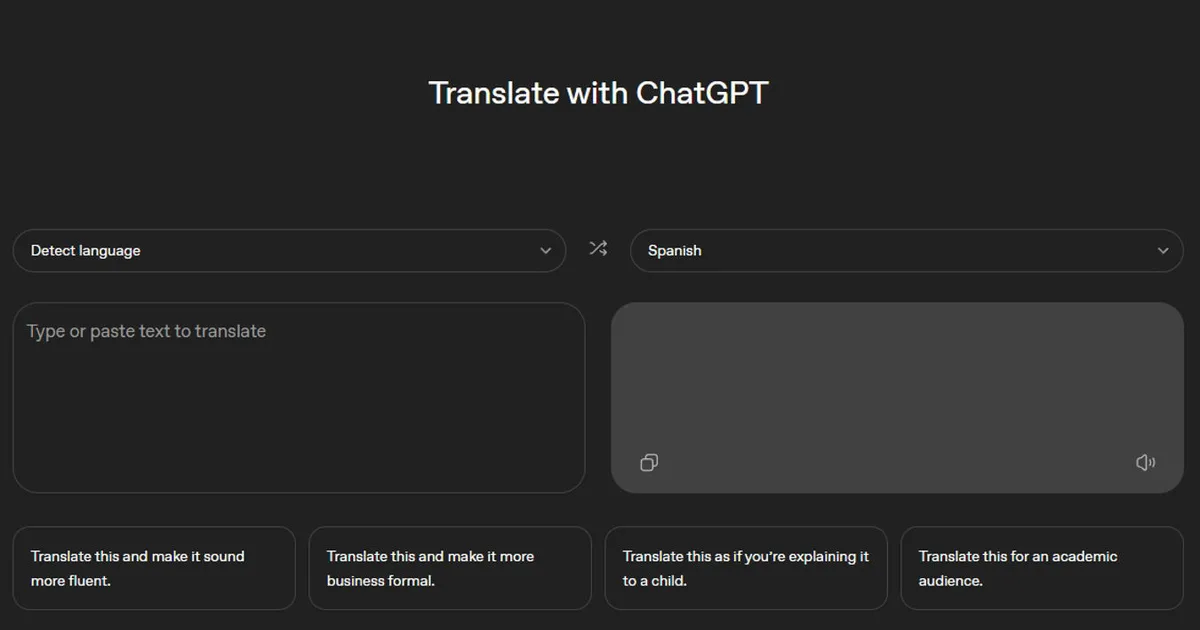
With ChatGPT Translate, users enjoy translations in over 50 languages, complete with automatic language detection. Simply paste your text, and let the magic unfold. There’s no need for complicated menus or jargon. The interface is intuitive, designed to fit seamlessly into your routine.
Redefining the Translation Experience
What truly sets this tool apart are its unique post-translation features. As soon as you receive your translation, you’re presented with quick prompts. With just a tap, you can refine your message in several impactful ways, such as:
- Making it more fluent.
- Adapting it for a formal business setting.
- Simplifying the language for a younger audience.
- Adjusting tone for academic clarity.
This functionality transforms a basic translation into a dynamic writing process, allowing you to iterate and enhance your text without starting over.
Familiar Yet Innovative Interface
At first glance, ChatGPT Translate feels strikingly familiar. You input on one side and get your translated output on the other. One of its best features is the option to skip selecting a source language, allowing you to focus on what matters: your message.
Seamlessly Evolving Potential
Once you’ve translated your text, the interface becomes your creative playground. The available prompts transition you into the main ChatGPT environment, with instructions that guide you through various revisions. Whether you’re softening a statement or refining it for a specific audience, this tool supports full creative expression.
Understanding the Limitations
While the quality of translations is commendable, certain limitations are evident. Currently, ChatGPT Translate lacks robust support for image translations, leaving users to rely on a plain text interface.
Navigating Mobile Flexibility
On mobile devices, the platform shines with its microphone feature, enabling you to speak directly what you want translated. However, it still falls short in other areas like document translations and real-time conversations—domains where competitors like Google Translate have historically excelled.
Keeping an Eye on Competition
The landscape of translation is constantly changing. Google is rolling out advanced updates powered by Gemini, focusing on nuanced language use including idioms and local expressions. These advancements are poised to elevate the standard of translation tools significantly.
As you consider which tool meets your needs, it’s wise to keep ChatGPT Translate for when the finesse of your message matters just as much as the words themselves. Meanwhile, holding onto Google Translate will ensure you have the breadth of languages at your fingertips. If OpenAI enhances its offerings with features like image input and document support, the competition will undoubtedly heat up.
Inspire Your Communication Journey
In a world where every word counts, why not make them resonate? Explore ChatGPT Translate, refine your messaging, and express yourself with clarity and elegance. Your communication deserves nothing less!