Transform Your Google Docs into Engaging Audio Summaries with Gemini
Google is taking innovation to the next level with its latest feature: Audio Summaries in Google Docs. This exciting development is designed for busy professionals and beauty enthusiasts alike, allowing users to absorb core insights from lengthy documents while on the move. Imagine transforming your vital reports, meeting minutes, or product guides into dynamic audio experiences that you can enjoy like a podcast—perfect for those moments when multitasking is essential.
Your Google Doc, Now in Podcast Form
Imagine getting the essence of an entire document without having to read every word. With Audio Summaries, you can now listen to concise, AI-generated overviews of your Google Docs. Whether you’re on a treadmill, preparing breakfast, or walking to a meeting, this feature lets you stay informed effortlessly.
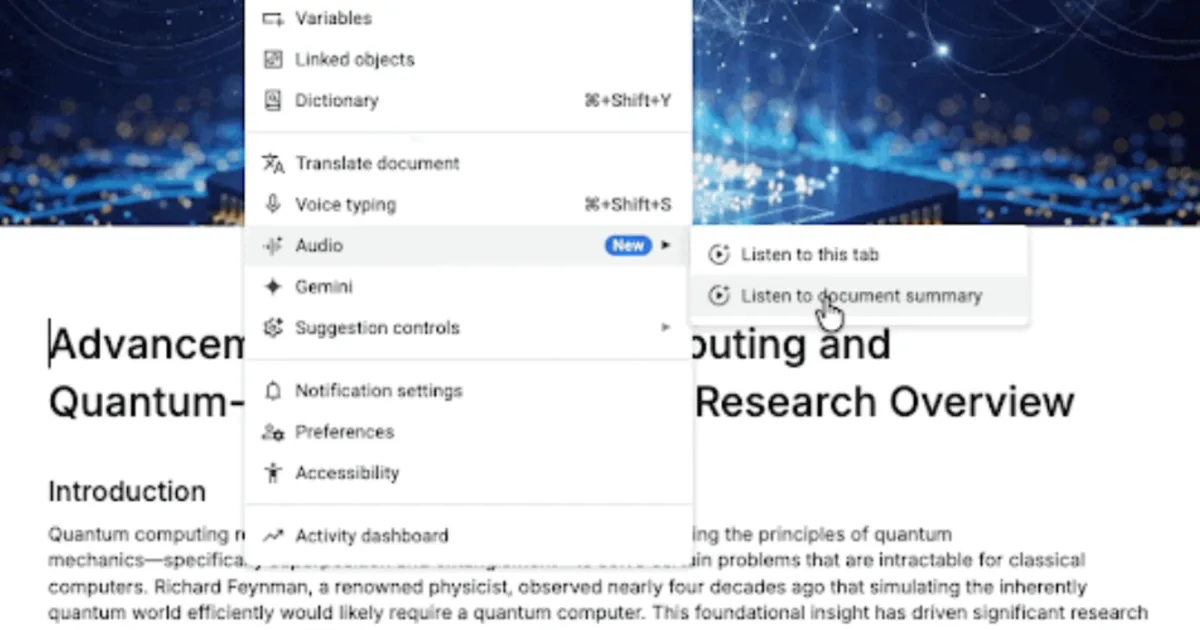
To access Audio Summaries, simply navigate to Tools > Audio > Listen to document summary in Google Docs. The powerful Gemini AI scans your document and crafts a narrated summary that typically lasts just a couple of minutes. You can also opt for a “Listen to this tab” feature, giving you the advantage of hearing the entire page narrated aloud when specifics matter.
A Natural Listening Experience
One of the hallmark features of Google’s new offering is the impressive quality of the audio. The voices are designed to sound natural, much like your friendly Gemini AI assistant. You have full control over playback, with options to adjust speed, pause, or scrub through the timeline. Plus, you can choose from various voice styles, enabling you to tailor your listening experience.
- Customizable Playback Controls
- Play and pause at your leisure
- Adjust playback speed
- Choose different voice styles
Availability, Productivity Boost, and a Catch
As exciting as it sounds, the Audio Summaries feature is rolling out gradually and is currently exclusive to paid Workspace users. This includes subscribers to Workspace Business (Standard and Plus), Enterprise plans, and certain AI add-ons like Google AI Ultra and AI Pro. While the feature can significantly enhance your productivity—especially for multitaskers or those with accessibility needs—it’s essential to be mindful. AI-generated summaries may overlook some critical details, so always consider listening to key sections for a comprehensive understanding.
In a world where every moment counts, Google’s Audio Summaries in Docs is a game-changer. As you embrace this innovative tool, imagine the possibilities it opens up for enhancing your daily tasks while maintaining your beauty and wellness goals. So why not give it a try? Transform how you consume information and streamline your tasks with just a few clicks.
Your next step to greater productivity is just a click away—why not listen to your documents today?