Revolutionize Your Browsing: The Free Extension That Reduces Your Daily Tabs by 50%
Whenever I launch my web browser, it often resembles a chaotic battlefield of tabs. From tools I plan to explore to articles in progress and ongoing Google searches, the screen becomes a jumble of 20 to 30 tabs that I convinced myself are essential. With each new tab, productivity takes a hit, and the browser slows down. Thankfully, all of this changed once I discovered Workona, a free browser extension designed to revolutionize my workflow.
Experience a Streamlined Workspace
Create a Distraction-Free Environment
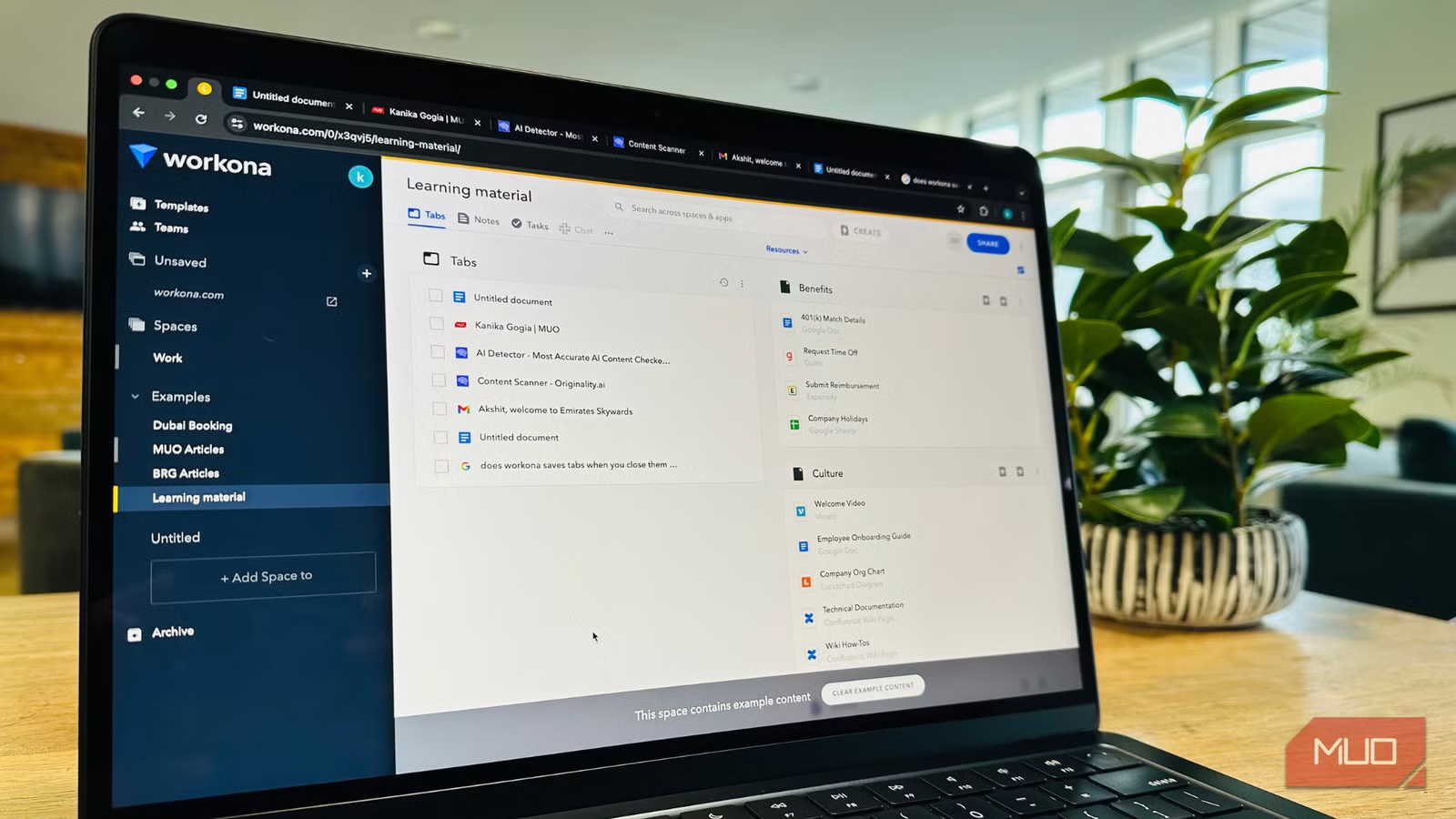
Workona transcends the typical tab manager by introducing an integrated workspace management system right in my browser. Instead of a lengthy list of open tabs, it allows me to neatly organize my tabs into specific workspaces. Picture each project having its own mini desktop—everything I need is housed in its dedicated space.
In the past, juggling tasks like drafting an article, researching tech trends, and booking hotels left my browser cluttered with an overwhelming number of tabs, some lingering for days. While bookmarks were a temporary fix, they didn’t quite cut it. With Workona installed on my Chrome browser, I find my digital workspace tidied up and efficient. I’ve set up distinct areas for client projects, research, and personal planning, significantly enhancing my productivity. Each workspace loads all relevant tabs with a simple click, hiding everything else and allowing me to focus.
Switching between projects using Workona feels like toggling between virtual desktops, creating a clean, fast, and distraction-free environment. My vital tabs are organized and accessible without being cluttered.
Highlighting My Favorite Features
A Toolbox for Enhancing Productivity
-
User-Friendly Setup
Upon installing Workona, I was immediately drawn to its sleek interface. The organization of workspaces on the left and tabs in the center makes navigation seamless. Unlike apps that require a steep learning curve, Workona welcomes you right away, adapting flexibly to your workflow. Adding or removing sections is a breeze. -
Dedicated Workspaces
Each project deserves its own space, and Workona provides just that. Even when I close my browser, my tabs remain saved in a well-structured manner. This gives me peace of mind, knowing that my critical information is always at hand, along with the option to add notes and tasks. -
Integrations with Essential Tools
One standout feature is its integration with popular cloud apps. I can link Google Docs, Asana, Trello, Slack, and others without opening them in separate tabs. This keeps my essential tools front and center, eliminating unnecessary clutter. -
Universal Search Functionality
Finding my tabs and workspaces has never been easier. With a search bar located at the top center of the main page, I can instantly locate documents and links. This is a huge time-saver compared to scrolling through bookmarks. - Effortless Task Switching
Transitioning from one project to another has become effortless. Whether I’m booking travel or gathering research, I can swiftly switch tasks with just one click, ensuring I pick up right where I left off.
With its rich features, Workona stands out in my daily productivity toolkit.
Free vs. Paid Plans
Understanding Your Options
Workona Tab Manager is compatible with Google Chrome, Microsoft Edge, and Firefox, and it’s free to download and use. While there are subscription plans for individuals, teams, and enterprises, the free account remains available indefinitely—not merely a trial version.
The free version allows the creation of up to five workspaces and the addition of unlimited content, including links, notes, and tasks. You can even collaborate with other free users, making it sufficient for most occasions. For solo users or those with lighter workloads, the free version is often enough.
Conversely, the Pro version offers unlimited workspaces, priority support, session backups for up to 90 days, and extra integrations. Starting at just $7, the Pro plan is ideal for those with complex workflows or collaborative teams.
Why You Should Try Workona
Workona has quickly become one of my favorite Chrome extensions. It doesn’t just manage tabs; it revolutionizes how I approach my work. By allowing me to group my digital tasks into organized workspaces, this extension reduces overwhelming noise and simplifies my workflow.
If your web browser often feels cluttered and unmanageable, Workona may be the solution you didn’t know you needed. By setting up a few workspaces, you’ll see just how well your browser can perform and feel a newfound sense of control over your digital life.
Take the leap—transform your browser experience today!