PackPack
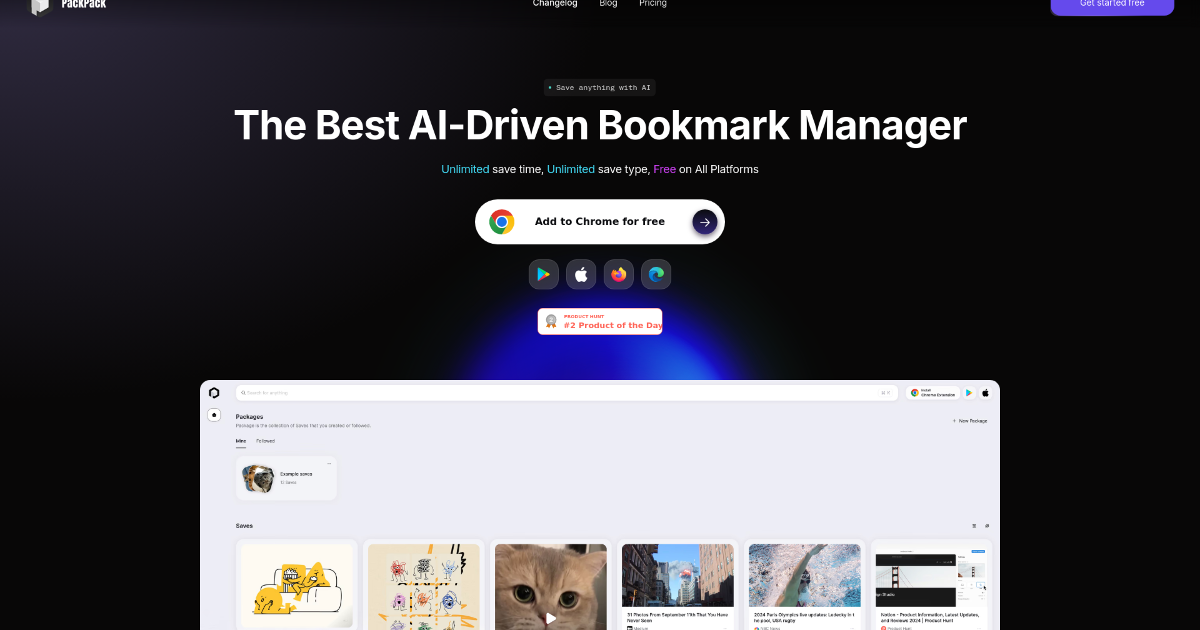
In today’s fast-paced digital world, managing the vast amount of online content we encounter daily can be overwhelming. PackPack emerges as a solution, offering an AI-driven approach to streamline this process.
What is PackPack?
PackPack is an innovative AI-powered bookmark manager designed to simplify the saving, organizing, and accessing of online content. Whether it’s articles, images, videos, or social media posts, PackPack ensures that valuable information is just a click away. By leveraging advanced AI technology, it transforms the traditional bookmarking experience into a more efficient and user-friendly process.
Key Features of PackPack
-
AI-Powered Saving: With a single click, users can save various types of content, including articles, images, videos, and social media posts. The AI ensures compatibility across thousands of websites, making the saving process seamless. (chromewebstore.google.com)
-
Distraction-Free Reading: PackPack provides a clean reading experience by removing ads and pop-ups, allowing users to focus solely on the content. (chromewebstore.google.com)
-
Advanced Search Capabilities: Users can perform full-text searches across all saved content, including articles, metadata, and AI-generated tags. Advanced image recognition allows searching based on visual content. (chromewebstore.google.com)
- Content Summarization: The AI-driven TL;DR feature quickly summarizes saved content, enabling users to grasp the main ideas without reading the entire text. (chromewebstore.google.com)
Benefits and Advantages
-
Enhanced Productivity: By organizing and summarizing content efficiently, PackPack saves users time, allowing them to focus on more critical tasks.
-
Cross-Platform Compatibility: PackPack works seamlessly across different devices and browsers, ensuring access to saved content anywhere. (chromewebstore.google.com)
- User-Friendly Interface: Its intuitive design makes it easy for users to start saving and organizing content immediately. (chromewebstore.google.com)
How PackPack Works
PackPack operates through a browser extension that adds a save button to web pages. Users can click this button to instantly save content to their PackPack account. For images, a hover bubble appears, allowing easy saving. On mobile, content can be shared directly to PackPack. Once saved, PackPack’s AI analyzes and organizes the content, generating summaries, extracting key information, and tagging images automatically. Users can then search their saved content using natural language queries, with PackPack’s AI understanding context and relevance beyond simple keyword matching. (aipure.ai)
Use Cases / Real-World Applications
-
Researchers: Organize and review crucial documents and articles efficiently.
-
Artists: Tag and find visual inspiration easily.
-
Project Managers: Store and synchronize project documents across devices.
-
Educators: Save educational materials and articles to enhance class preparation.
-
Freelance Photographers: Streamline editing processes.
- Culinary Bloggers: Save and categorize recipes and cooking videos. (chromewebstore.google.com)
Comparison with Alternatives
While there are several bookmark management tools available, PackPack distinguishes itself with its AI-driven features, such as content summarization and advanced search capabilities. These features enhance productivity and provide a more organized approach to managing digital content compared to traditional methods.
Pricing and Plans
-
Free Tier: Experience PackPack with a free plan that allows unlimited saves and supports all content types.
- Paid Tier: Organize your content more efficiently with tags and full search on the paid plan starting at $9.99 per month. (chromewebstore.google.com)
Pros and Cons
Pros:
-
Cross-Platform Compatibility: Access saved content across different devices and browsers.
-
User-Friendly Interface: Intuitive design for easy content saving and organization.
- Enhanced Productivity: Save time on searching and reading through content.
Cons:
-
Initial Setup Requirements: Users may need to spend some time setting up the tool and integrating it with their preferred browsers.
-
Limited Mobile Functionality: While mobile saving is a feature in development, current options are limited compared to desktop capabilities.
- Learning Curve for Advanced Features: Some users may find the advanced features require a bit of time to master. (chromewebstore.google.com)
Tips for Getting the Most Out of PackPack
-
Explore AI Features: Utilize content summarization and advanced search to enhance your workflow.
-
Organize with Tags: Use the tagging system to categorize and retrieve content efficiently.
- Stay Updated: Regularly check for updates to take advantage of new features and improvements.
Conclusion
PackPack offers a comprehensive solution for managing digital content, combining AI-driven features with a user-friendly interface. Whether you’re a researcher, educator, or professional, PackPack can enhance your productivity and streamline your workflow.
For more information, visit the official PackPack website.