Lido
In today’s fast-paced financial landscape, efficiency is paramount. Finance teams often grapple with the tedious task of converting PDFs into Excel spreadsheets—a process ripe for automation. Enter Lido, an AI-driven tool designed to revolutionize this workflow.
What is Lido?
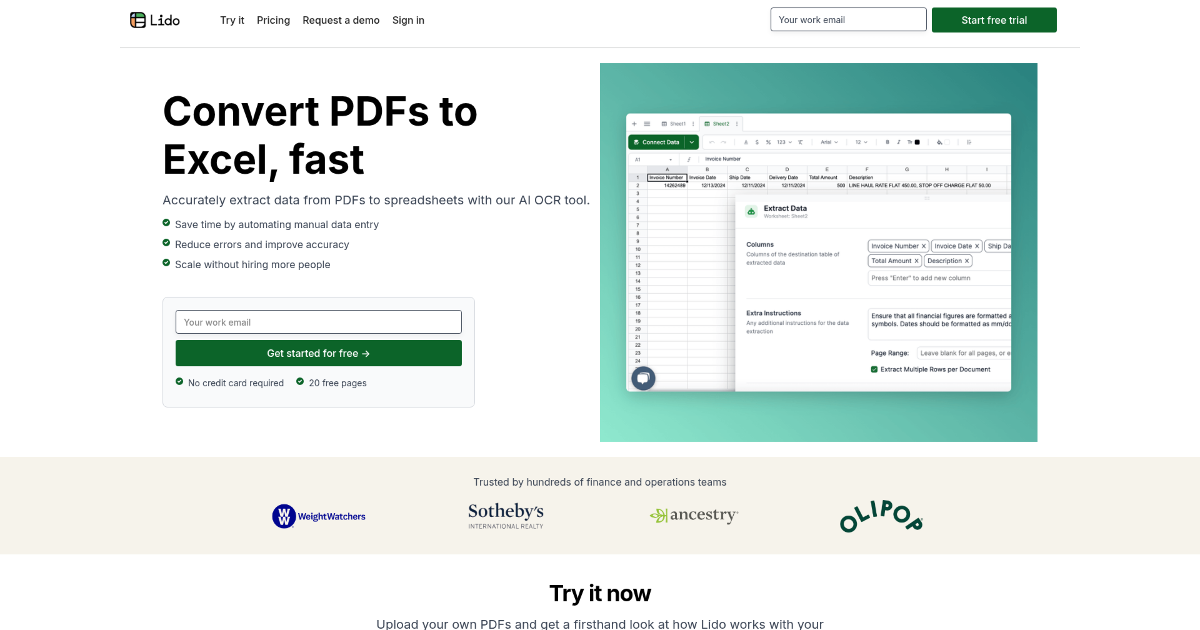
Lido is an innovative AI-powered Optical Character Recognition (OCR) tool tailored to streamline the conversion of PDFs and financial documents into Excel spreadsheets. Specifically designed for finance and operations teams, Lido automates the extraction of data from PDFs, significantly reducing manual data entry and minimizing errors. This tool is particularly beneficial for professionals handling large volumes of financial documents, offering a seamless solution to enhance productivity.
Key Features of Lido
-
AI-Driven Data Extraction: Lido utilizes advanced AI OCR technology to accurately extract data from both scanned and digital PDFs, ensuring high precision in data conversion.
-
Customizable Data Rules: Users can set specific rules for data extraction, such as converting vendor names to specific formats, enhancing the tool’s flexibility to meet diverse needs.
-
Table Extraction Capabilities: The tool can extract tabular data by allowing users to define the data area on a PDF page, which is then converted into a structured spreadsheet format.
- Automated Data Cleaning: Lido offers AI-driven data cleaning features, such as standardizing number formats and categorizing expenses, which helps maintain organized and error-free data.
Benefits and Advantages
-
Time Efficiency: Lido significantly reduces the time required for manual data entry, enabling users to process documents in minutes rather than hours.
-
High Accuracy: The tool boasts near-perfect accuracy in data extraction, minimizing errors and enhancing data reliability.
-
Scalability: It allows businesses to scale their operations without the need for additional personnel, making it cost-effective for growing companies.
- User-Friendly Interface: The intuitive design ensures that users of all technical levels can easily navigate and utilize the tool.
How Lido Works
Lido operates by allowing users to upload their PDF documents into the platform. The AI then processes these documents, extracting relevant data based on predefined rules or user instructions. This data is subsequently organized into structured tables, which can be exported to Excel, Google Sheets, or CSV formats. The tool also supports automated workflows, enabling users to fetch new PDFs from sources like Google Drive, Gmail, Outlook, or OneDrive, and receive processed data via email or directly into their database. (lido.app)
Use Cases / Real-World Applications
-
Finance Teams: Utilizing Lido for efficient processing of invoices, bank statements, and credit card statements.
-
Accounting Departments: Employing the tool to streamline data entry and reporting tasks.
-
Small Business Owners: Leveraging Lido to reduce the workload on accounts payable teams and improve operational efficiency.
-
Operations Managers: Using the tool to automate document workflows and enhance productivity.
-
Legal Firms: Adopted by legal firms for contract abstraction.
- Educational Institutions: Utilized by educational institutions for teaching data management.
Comparison with Alternatives
When compared to other automation software and productivity tools, Lido stands out due to its high accuracy and user-friendly interface. While some alternatives may offer similar features, Lido’s AI-driven data extraction and customizable rules provide a unique advantage in handling complex financial documents.
Pricing and Plans
Lido offers several pricing plans to cater to different business needs:
-
Starter: $24 per month, suitable for individuals and small teams with up to 100 pages per month.
-
Professional: $95 per month, designed for small finance teams handling up to 500 pages per month.
-
Business: $150 per month, ideal for growing businesses needing up to 1,000 pages per month.
- Enterprise: Custom pricing, tailored for large teams with specific integration and page limit needs.
For the most accurate and current pricing details, refer to the official Lido website. (help.lido.app)
Pros and Cons
Pros:
-
Time Efficiency: Lido significantly reduces the time required for manual data entry, enabling users to process documents in minutes rather than hours.
-
High Accuracy: The tool boasts near-perfect accuracy in data extraction, minimizing errors and enhancing data reliability.
-
Scalability: It allows businesses to scale their operations without the need for additional personnel, making it cost-effective for growing companies.
- User-Friendly Interface: The intuitive design ensures that users of all technical levels can easily navigate and utilize the tool.
Cons:
-
Initial Learning Curve: While user-friendly, some advanced features may require initial familiarization.
-
Mobile Limitations: Currently, Lido does not support mobile usage, which may limit accessibility for some users.
- Integration Restrictions: The tool’s integration capabilities are somewhat limited, requiring manual processes for certain tasks.
Tips for Getting the Most Out of Lido
-
Define Clear Extraction Rules: Utilize Lido’s customizable data rules to tailor the extraction process to your specific needs.
-
Regularly Update Templates: Keep your extraction templates updated to accommodate any changes in document formats.
- Leverage Automated Workflows: Set up automated workflows to fetch and process documents from your email or cloud storage, enhancing efficiency.
Conclusion
Lido offers transformative capabilities for professionals managing financial documents, combining AI-driven precision with user-friendly features. Its unique approach to data extraction and cleaning not only saves time but also enhances data accuracy and reliability. For finance teams and operations managers looking to streamline their workflows, Lido provides an invaluable solution that balances cost-efficiency with high performance.
For more information, visit the official Lido website.