Introducing Gmail’s Personalized AI Inbox: Explore Enhanced AI Overviews and New Features

Google has stepped up its game with the launch of a revolutionary AI Inbox for Gmail, tailored for those who value efficiency and organization in their busy lives. This new feature promises to not only provide a personalized overview of your tasks but also keep you updated on essential communications. From snoozing reminders to sorting through essential emails, this vibrant enhancement is here to redefine your email experience.
Discover the New AI Inbox
A Personalized Touch
The innovative AI Inbox introduces two dynamic sections: “Suggested to-dos” and “Topics to catch up on.” Here’s where Gmail takes the lead in helping you prioritize what truly matters.
-
Suggested to-dos: Imagine receiving instant reminders about crucial tasks, like paying a bill due tomorrow or confirming details for your next doctor’s appointment. This feature ensures nothing slips through the cracks.
- Topics to catch up on: Stay informed with concise updates tailored for you, such as the status of your Lululemon return or the availability of your end-of-year financial statement. These updates are conveniently categorized into “Finances,” “Purchases,” and more.
Image Credits: Google
Gmail’s Commitment to User Experience
Blake Barnes, VP of Product at Google, describes this initiative as “us delivering on Gmail proactively having your back.” With the traditional inbox still accessible, users can easily toggle this new view to simplify their email management, cutting through the noise of incoming messages.
Enhanced Search Capabilities
AI Overviews in Gmail Search
One of the most significant improvements is the introduction of AI Overviews in Gmail’s search feature. Users can now inquire about their inbox with natural language questions, eliminating the tedious need for keyword searches.
For example, if you want to recall the name of the plumber who quoted you for renovations last year, simply ask, “Who was the plumber that gave me a quote for the bathroom renovation last year?” Instantly, you’ll receive a concise overview highlighting essential details directly from your emails.
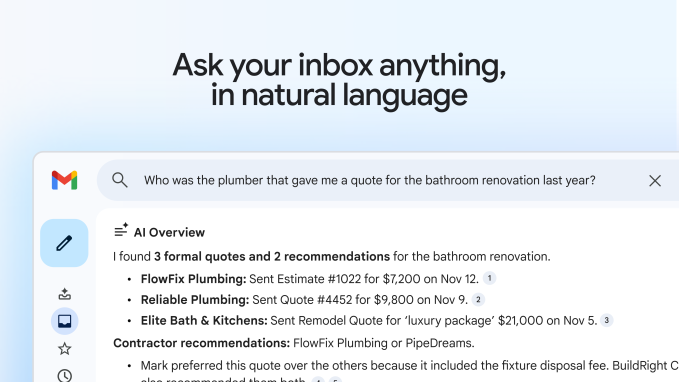
Image Credits: Google
As Blake notes, “We scour every email in your inbox to provide answers on top.” This personalization ensures the content remains relevant and tailored specifically to you.
Opt-In Features for Privacy
Google emphasizes the optional nature of these features. The AI capabilities do not utilize personal data to enhance foundational models, relying instead on a strictly confined environment for processing personal data.
Introducing the Proofread Feature
Polishing Your Writing
Google is also unveiling a handy Proofread feature, aimed at enhancing your written communication. This tool analyzes your drafts to refine clarity and structure, offering suggestions with just a click.
- Suggestions include improvements in word choice, ensuring conciseness, recommending active voice, and simplifying complex sentences.
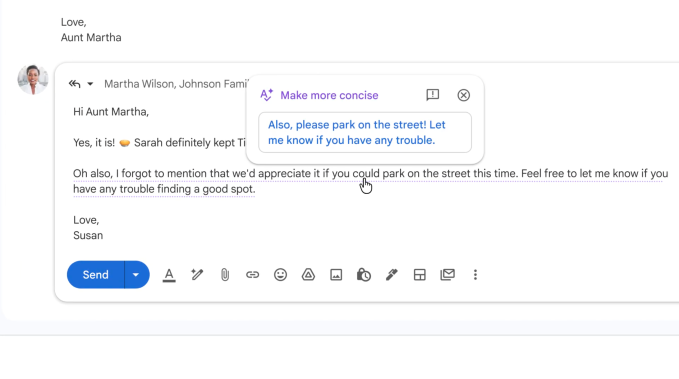
Image Credits: Google
For instance, if you write “might inflict disturbance,” the tool will suggest “might disturb.” It highlights inconsistencies, such as using “weather” instead of “whether,” making it comparable to popular services like Grammarly.
Why Google’s Approach Matters
By integrating its own proofreading capabilities, Google aims to meet user needs without relying on third-party tools.
Accessibility and Future Features
While these AI-driven features are currently available to select users, Google has exciting news for everyone. Help Me Write, AI Overviews for threaded emails, and Suggested Replies are being rolled out to all users, once limited to premium subscribers.
- Help Me Write: Craft emails effortlessly from just a single prompt.
- AI Overviews for threaded emails: Quickly grasp multi-reply threads.
- Suggested Replies: Receive relevant responses that echo your tone and style.
Incorporating these upgraded functionalities into your daily routine can transform how you manage your communications, making your email life more serene and organized.
Ready to elevate your email game? Embrace these enhancements that Google is bringing your way, and discover how they can streamline your daily tasks and improve your writing. Dive into your Gmail today—your empowered inbox awaits!