Gmail Introduces AI Secretary: Effortlessly Schedule Meetings in Calendar
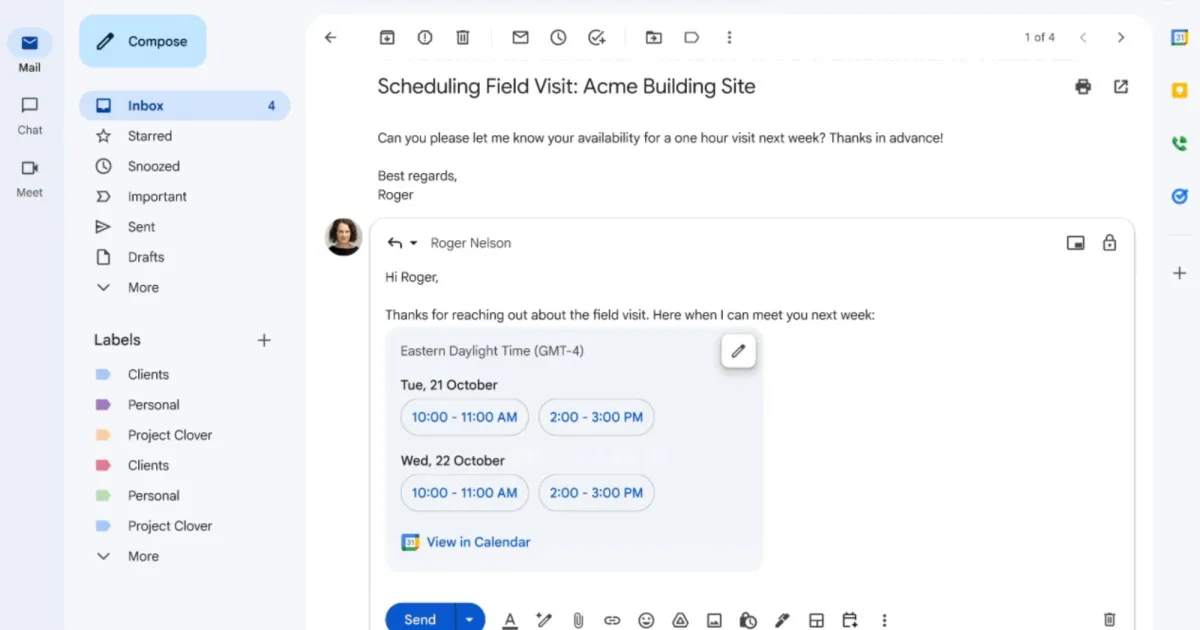
Think of it as an assistant that fixes meetings for you autonomously.
Navigating the complexities of scheduling meetings can be a real challenge, especially when juggling multiple time zones. If you’ve ever found yourself ensnared in endless email chains, you’ll be thrilled to discover Google’s latest innovation. Their AI-powered scheduling system in Gmail promises to simplify the way we coordinate meetings, offering a solution to this perennial problem with elegance and ease.
What’s New?
Introducing Help Me Schedule, a remarkable feature powered by Google’s Gemini technology. This intelligent tool scans your email conversations and seamlessly checks your calendar entries to propose suitable meeting times. Gone are the days of tedious back-and-forth emails! With Help Me Schedule, finding the right time slot for a meeting is as easy as a click.
Google explains that when you’re working to align schedules within an email, the Gmail interface will intelligently highlight a "Help Me Schedule" button in the toolbar. Based on the context of your email and the estimated meeting duration, this smart feature automatically recommends the most convenient time slots.
Image Credit: Google
How Does It Work?
The magic starts when you’re crafting a response to an email regarding scheduling. As soon as the AI detects your intent to discuss meeting logistics, it springs into action—extracting context behind the scenes. To access this smart option, just click on the Calendar icon at the bottom of the email composer, which will reveal the sleek, pill-shaped Help Me Schedule button.
This feature is a breath of fresh air for busy professionals. Once you click on it, Gemini analyzes both the email thread and your calendar, pinpointing the ideal meeting slot. The scheduling options are displayed on a card with simple, actionable buttons.
Here’s how it works:
- Click the Help Me Schedule button.
- Review the suggested meeting times.
- Choose the slot that works best for you.
- Hit the button, and voilà! The meeting is set, complete with an invite that automatically populates your Google Calendar.
Currently, this feature is designed for one-on-one interactions, and it doesn’t support group emails just yet. But even so, it’s a major leap forward in streamlining our scheduling woes.
In a world where time is precious, Google’s Help Me Schedule feature is the perfect ally. Embrace the effortless coordination of meetings and focus more on what truly matters—building relationships and driving results.
Ready to streamline your scheduling process? Give the Help Me Schedule feature a try and experience the freedom it offers!