Fellow
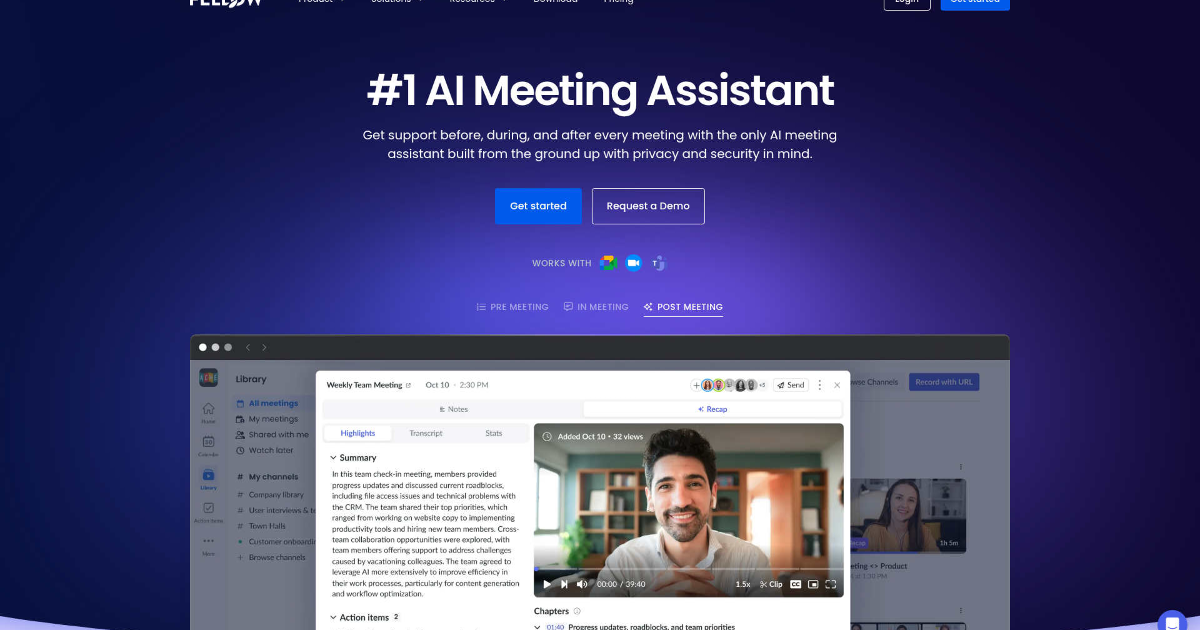
In today’s fast-paced work environment, staying organized and efficient is paramount. Fellow, an innovative AI-powered meeting assistant, is designed to streamline your meeting processes, allowing you to focus on what truly matters.
What is Fellow?
Fellow is an AI-driven productivity tool that automates meeting notes, transcriptions, and follow-ups, transforming the way teams collaborate. By integrating seamlessly with your existing workflow, Fellow ensures that every meeting is productive and well-documented.
Key Features of Fellow
-
AI-Powered Meeting Notes: Automatically captures detailed notes and action items during meetings, enabling participants to concentrate on the conversation without distraction.
-
Comprehensive Meeting Insights: Utilize the "Ask Fellow" feature to gain insights on meetings you missed, ask questions about specific meetings, and even draft follow-up emails.
-
Centralized Recordings and Summaries: All meeting recordings and summaries are stored in one accessible location, with privacy controls to manage who can view them.
- CRM Automation: Seamlessly updates CRM systems by syncing meeting information and suggesting fields to update based on discussions.
Benefits and Advantages
-
Time Efficiency: Streamlines the meeting process by automating note-taking and follow-ups, leading to significant time savings.
-
Enhanced Collaboration: Facilitates collaborative agendas and pre-meeting briefs, ensuring all participants are well-prepared.
-
Privacy and Security: Prioritizes user privacy with robust control settings over who can access meeting notes and recordings.
- Integration Capabilities: Connects with over 50 tools, integrating seamlessly into existing workflows.
How Fellow Works
Fellow integrates with major meeting platforms like Google Meet, Zoom, and Microsoft Teams. Once set up, it automatically joins scheduled meetings, records conversations, transcribes them, and generates summaries and action items. These outputs are then stored in a centralized location, accessible to authorized team members.
Use Cases / Real-World Applications
-
Customer Success Teams: Utilize Fellow for actionable meeting notes, follow-ups, and workflows.
-
Marketing Teams: Benefit from the quick capture of AI meeting notes to maintain fast-paced operations.
-
Engineering Departments: Rely on accurate AI meeting notes to document technical discussions.
- Leadership Teams: Leverage secure AI meeting notes for strategic planning and decision-making.
Comparison with Alternatives
While there are other AI meeting assistants available, Fellow distinguishes itself with its extensive integration capabilities, user-friendly interface, and robust security features. Its focus on automating meeting notes and follow-ups sets it apart from competitors.
Pricing and Plans
Fellow offers several pricing tiers to cater to different needs:
-
Free: $0 per user per month. Includes 5 AI meeting notes and recordings per user, meeting summaries, transcriptions, action items, and integrations with Google Meet, Zoom, MS Teams, and Slack.
-
Team: $7 per user per month (billed annually, $11 monthly). Includes everything in Free, plus 10 AI meeting notes and recordings per user, meeting automations, and project management integrations.
-
Business: $15 per user per month (billed annually, $23 monthly). Includes everything in Team, plus unlimited AI notes and recordings, org-wide meeting templates, sales AI recap templates, and CRM integration.
- Enterprise: $25 per user per month. Includes everything in Business, plus advanced security, domain control, user provisioning, Salesforce + HubSpot AI sync, and transcript redaction.
Pros and Cons
Pros:
-
Time Efficiency: Automates note-taking and follow-ups, saving significant time.
-
Enhanced Collaboration: Facilitates collaborative agendas and pre-meeting briefs.
-
Privacy and Security: Offers robust control over access to meeting notes and recordings.
- Integration Capabilities: Seamlessly integrates with over 50 tools.
Cons:
-
Initial Learning Curve: Users may need time to become familiar with all features and functionalities.
- Dependency on Internet: Requires a stable internet connection for optimal performance.
Tips for Getting the Most Out of Fellow
-
Set Up Integrations: Connect Fellow with your existing tools to streamline your workflow.
-
Customize Meeting Templates: Use Fellow’s customizable templates to standardize meeting processes across your organization.
- Utilize the "Ask Fellow" Feature: Leverage this AI assistant to quickly retrieve information from past meetings.
Conclusion
Fellow is a game-changer for professionals seeking to optimize their meeting processes. With its AI-driven capabilities, it not only enhances productivity but also ensures secure and efficient meeting management. Whether you’re in marketing, engineering, or leadership, Fellow provides the tools necessary to streamline your workflow and focus on what truly matters—effective communication and collaboration.
For more information, visit Fellow’s official website.