Experience Smarter Navigation and Enhanced Features with Gemini on Android Auto: Quick Replies and Perfect Music Recommendations
Now Available in 45 Languages with More on the Way
In an exciting development for tech-savvy drivers, Google has rolled out Gemini on Android Auto, replacing the traditional Google Assistant for those who have upgraded to the Gemini app. This innovative feature is not just a voice assistant; it transforms your driving experience into a seamless conversation with your dashboard. Imagine navigating through over 250 million vehicles globally with a more intuitive AI—it’s all part of making your driving moments smarter and safer.
What’s New with Gemini?
With Gemini, you can wave goodbye to cumbersome voice commands. This upgrade allows you to have natural conversations, ask follow-up questions, and manage complex tasks—all while keeping your hands firmly on the steering wheel.
Here’s what you need to know:
- Natural Interaction: Speak as you normally would—no need to memorize commands.
- Easy Activation: Trigger Gemini by saying “Hey Google,” tapping the mic on your screen, or long-pressing the voice button on your steering wheel.
- Safety First: Enjoy a hands-free experience designed for safe driving.
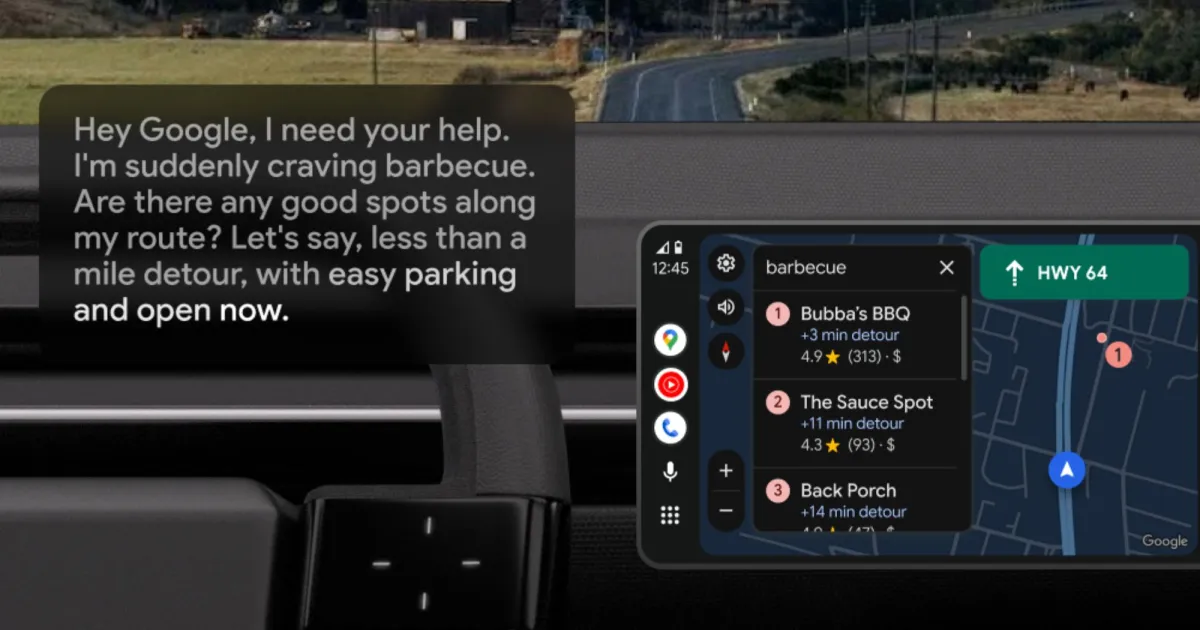
Image Credit: Google
Why Is This Important?
Gemini significantly enhances the functionality of Android Auto, transforming it from a basic voice assistant into a digital co-pilot. This means enhanced user experiences across various applications:
Enhanced Google Maps
- Smart Searching: Ask Gemini to find optimal locations along your route.
- Insightful Reviews: Gain insights about businesses, such as whether they’re dog-friendly or their most popular dishes.
Effortless Messaging
- Message Management: Edit texts on the fly, include ETAs, and even add emojis.
- Language Support: Instantly translate messages in over 40 languages.
Streamlined Email and Productivity
- Manage Emails: Search your Gmail, summarize unread emails, and access essential details without distraction.
- Calendar Coordination: Effortlessly navigate through calendars and reminders—all while you drive.
Musical Intuition
- Smart Music Selection: Whether you prefer mood-based playlists or tracks for specific occasions, Gemini can cater to your taste, integrating easily with YouTube Music and Spotify.
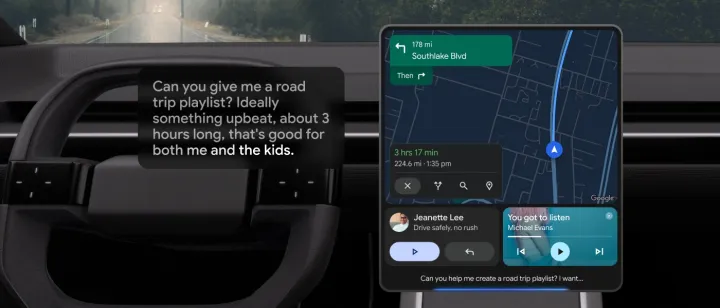
Image Credit: Google
Why You Should Care
For daily users of Android Auto, Gemini can turn tedious driving time into a productive or creative space—all without needing to touch your phone.
- Smart Navigation: Drive smarter with intuitive guidance.
- Quick Messaging: Send messages efficiently while keeping your focus on the road.
- Conversational Learning: Use driving time to brainstorm or rehearse—just say, “Hey Google, let’s chat.”
What’s Next?
The journey with Gemini on Android Auto is just beginning. Google plans to introduce more features and capabilities over time.
- Broader App Support: Expect integration with Gmail, Google Calendar, Samsung’s note-taking features, and many third-party applications in the future.
In this rapidly evolving digital landscape, embracing tools like Gemini can elevate your driving experience to new heights. Ready to unlock the true potential of your daily commute? Embrace the new era of driving with Gemini today!